
Melody Mix Studio
Reviews
Melody Mix Studio succeeds by removing barriers to music creation. The character-based sound system makes layering rhythms intuitive, and the lack of scores or timers encourages pure experimentation. Visual feedback from animated characters adds a satisfying layer of interaction. While it lacks save functionality, the freeform nature and cross-device compatibility make it a solid choice for casual play. It is especially effective for introducing young children to the basics of composition in a stress-free environment.
About this game
Creative Sound Building
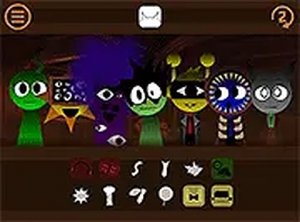
Melody Mix Studio turns music creation into a visual puzzle. Each character icon produces a distinct beat or melodic phrase when activated. By layering these sounds, players construct original compositions. The absence of scoring or time constraints encourages open-ended exploration. Beginners can start with a single loop, while more experienced users can stack multiple tracks to create complex arrangements.
Character-Driven Audio Palette
The game features a cast of colorful characters, each assigned a unique sound. Some provide steady percussion, while others add harmonic textures or playful effects. The visual design makes it easy to identify which sound each character contributes. Players can mix characters from different themed sets, expanding the range of available audio elements.
Intuitive Touch and Click Controls
Adding a sound requires only a drag-and-drop motion onto a character. To remove a sound, a simple swipe or click silences that character. This direct interaction keeps the focus on the music rather than complex menus. The interface works smoothly on both touchscreens and traditional mouse setups, making it accessible across devices.
Freeform Play Without Pressure
There are no levels to complete or high scores to chase. The entire experience centers on personal expression. Players can pause, undo, or restart at any moment. This design makes it suitable for young children exploring cause and effect, as well as adults looking for a low-stress creative outlet. The browser-based format means progress is not tied to a single device.
Visual Feedback and Immersion
When a character is activated, they respond with animated movements that correspond to their sound. This visual cue helps players associate specific actions with audio changes. A full-screen mode removes on-screen distractions, allowing deeper focus on the music. The bright, friendly art style reinforces the playful tone of the activity.








Comments
0 comments