
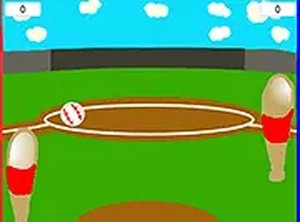
Baseball Pong Arcade Challenge
Reviews
Baseball Pong Arcade Challenge successfully merges the simplicity of pong with baseball aesthetics. The controls are responsive, and the computer opponent provides a fair challenge. The home run celebration after reaching 10 points is a nice touch. It is a great choice for a quick, family-friendly gaming session.
About this game
Game Introduction
Baseball Pong Arcade Challenge is an online sports game that combines the familiar paddle-and-ball action of pong with the theme of baseball. Players control a paddle on their side of the screen and aim to hit a baseball toward the opponent's side to score points. The game is designed for desktop browsers and offers a free, browser-based experience with no downloads required. It provides a fresh twist on traditional pong by incorporating baseball elements, making it an engaging choice for fans of both genres. The core objective is to outscore the computer opponent by reaching 10 points first, which triggers a home run celebration. This sports challenge is family-friendly and suitable for players of all ages who enjoy simple, addictive gameplay.
How to Play
Players use a mouse or keyboard to move their paddle on their side of the screen. The ball bounces back and forth, and the goal is to hit it past the computer opponent to score a point. The computer attempts to block shots, so players need to aim carefully and adjust their paddle position quickly. Each point adds to the player's total, and reaching 10 points triggers a home run celebration. The game is optimized for desktop browsers, and a full-screen mode is available for a larger view. Practice and quick reflexes are key to success.
Game Features
Simple and addictive gameplay that blends pong mechanics with baseball. Smooth controls designed for desktop users. Full-screen mode for an immersive experience. Free to play with no downloads or installations needed. Family-friendly content suitable for players of all ages. The game is accessible directly in a web browser, making it easy to start playing instantly.
Tips for Success
Practice regularly to improve your reflexes and paddle control. Pay attention to the ball's trajectory and anticipate where it will land. Use angled shots to make it harder for the computer to block. Stay focused and adjust your paddle position quickly to counter the opponent's moves. Experiment with different paddle positions to find what works best for you. Enjoy the game and have fun improving your skills over time.







Comments
0 comments