
Golf Arcade Sports Puzzle Game
Reviews
Golf Arcade Sports Puzzle Game delivers a satisfying blend of puzzle strategy and arcade action. With nearly 40 unique holes, each level presents fresh obstacles that require careful planning. The controls are responsive on both mouse and touchscreen, making it accessible for casual players. The arcade mode adds welcome variety. Best of all, it's free and runs in any browser.
About this game
Game Introduction
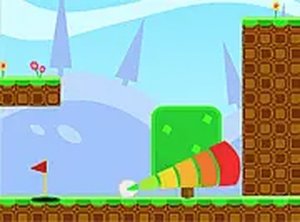
Golf Arcade Sports Puzzle Game offers a creative twist on classic mini-golf. Players aim to sink the ball into the hole on each level while navigating obstacles such as ramps, walls, and tricky terrain. With nearly 40 unique holes, the game provides a fresh challenge for players of all ages. Colorful graphics and smooth controls make it easy to pick up and play, whether you have a few minutes or a longer session. Best of all, it runs directly in your browser on mobile and desktop with no downloads or installations, and it is completely free. The core objective is to complete each hole in as few strokes as possible, earning stars based on performance. The game combines puzzle-like planning with precise aiming, offering a satisfying experience for casual and dedicated players alike.
How to Play
Using your mouse or touchscreen, aim your shot by dragging or tapping. Adjust the power carefully, then release to send the ball rolling toward the hole. Each level requires planning to overcome obstacles and reach the goal. You can also switch to full screen mode for a more immersive view. The aim is to sink the ball in as few strokes as possible, earning stars based on your performance. Arcade mode adds extra challenges, such as completing levels with limited moves or time. Practice each level to improve your score and unlock new challenges. The controls are intuitive, making it easy for new players to start while still offering depth for experienced ones.
Game Features
Nearly 40 levels with increasing difficulty. Arcade mode for extra challenges. Full screen option for immersive play. Smooth controls on both mouse and touchscreen. Free to play with no downloads or installations. Works on mobile and desktop browsers. The game offers a variety of creative hole designs that keep the gameplay fresh and engaging.
Tips for Success
Take your time to study each level's layout before shooting. Adjust your aim and power carefully to avoid obstacles. Practice regularly to improve your timing and accuracy. In arcade mode, plan your moves efficiently to meet limited move or time challenges. Replay levels to earn more stars and unlock new content.







Comments
0 comments