
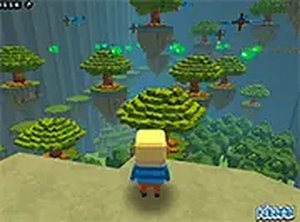
Kogama Adventure Platform Run
Reviews
Kogama Adventure Platform Run offers a delightful obstacle course experience for players of all ages. Its bright, cartoon-style visuals create a welcoming atmosphere, while the level design encourages careful timing and precision. The game is completely free with no downloads, making it instantly accessible. Though controls are simple, the challenge grows steadily, keeping each session engaging. It is a great choice for casual gamers looking for a safe, fun, and relaxing platform adventure.
About this game
Game Introduction
Kogama Adventure Platform Run is a browser-based platform game that invites players to explore a vibrant world filled with caves and challenges. As an adventure and RPG-style game, it focuses on navigating through levels with gaps, obstacles, and traps. The core objective is to reach new areas by carefully jumping and avoiding hazards. Its colorful graphics and straightforward mechanics make it accessible for casual players while offering enough variety to stay engaging. The game is entirely family-safe, with no violent or inappropriate content, making it suitable for children and adults alike.
How to Play
Players use keyboard and mouse controls to move their character. Typically, arrow keys or WASD are used for movement, and the spacebar or up arrow is used to jump over gaps and onto platforms. The goal is to avoid touching traps such as spikes or moving obstacles, as these will end the current run. The game progresses through a series of levels, each with a clear exit point that must be reached to advance. Timing is key: players must wait for moving platforms to align and plan jumps carefully. There are no complex combos or power-ups, so success relies on precision and patience. The game saves progress automatically, allowing players to continue from where they left off.
Game Features
Features include free-to-play gameplay with no in-app purchases, exclusive desktop support, and a full-screen mode for an enhanced experience. The game is family-friendly and suitable for all ages. It offers obstacle-based platforming that challenges timing and coordination, with colorful cartoon-style graphics that create a cheerful atmosphere. No downloads or installations are required, as the game runs directly in the browser. Simple controls make it easy for beginners to start playing immediately.
Tips for Success
Practice regularly to improve your timing and precision. Take your time to observe moving platforms and enemy patterns before making a jump. Learn from each mistake, as each failure teaches you something about the level layout. Stay patient and avoid rushing, as careful planning often leads to success. Focus on one obstacle at a time, and remember that progress is saved automatically, so you can always return to try again.








Comments
0 comments